RISD · Ghost in the Machine · AI Studio·Lesson 01·20 min read·Updated Sep 13, 2026
The Telephone Website
What you'll do
Everyone fills in a one page worksheet by hand: a website that does not exist yet, its pages, its colors, a drawing of its homepage. Then the sheets get swapped. You end up holding someone else's site, and they end up holding yours.
You open a coding agent called Codex and type $telephone. The agent interviews you about the sheet, in rounds, until nothing is left to guess. Every time the paper has no answer, you say so and guess out loud. The agent builds the site, publishes it to a real address on GitHub Pages, and hands back the link plus the list of every guess you made.
The gap between what the author drew and what got built is what we look at afterwards. The same gap opens every time you describe something to an agent. This lesson makes it big enough to see.
Before class: two accounts
The setup wizard below walks you through both, but they need an email you can check, so do them where you can read your mail.
| Account | Why | Cost |
|---|---|---|
| GitHub | Hosts your finished site for free. Your username becomes part of the address, so keep it short. | Free |
| ChatGPT Plus | Codex signs in with it, and the CLI needs the Plus plan. A free account is not enough. Subscribe before class; you can cancel after. | $20/month |
Set up your computer
One script does the whole setup and tells you what to click at each step. It installs four tools, signs you in twice, and installs the skills. Stop it any time with Ctrl+C; running it again skips what is already done.
Open Terminal
Press ⌘+Space, type Terminal, press Return. A window with a blinking cursor appears. Anything you paste there runs when you press Return.
Download and run the wizard
Copy this line, paste it into Terminal, press Return.
curl -fsSL https://ai.reidsurmeier.wtf/telephone/setup.sh -o setup.sh && bash setup.shThe first part downloads the script to a file named setup.sh. The second part runs it.
About Homebrew
Most Macs do not have Homebrew, the installer that developer tools use. You do not need to get it yourself. The wizard checks for it and installs it as its second stage. Expect two things during that stage: the Mac asks for your login password, and nothing shows while you type it, which is normal. Then Apple's command line tools download, which can take five to ten minutes on school wifi. Leave the window open until the wizard moves on.
Open PowerShell
Press the Windows key, type PowerShell, press Enter. A blue or black window with a blinking cursor appears. Anything you paste there runs when you press Enter. Windows 11 is recommended. Windows 10 usually works, but OpenAI only supports it on a best effort basis.
Nothing needs to be installed first. Windows ships with its own installer, winget, and the wizard uses it when it is there. On a PC without it, the wizard downloads the official Git, GitHub CLI and Node installers itself and runs them quietly. Either way you only click Yes on the approval boxes.
Download and run the wizard
Copy this line, paste it into PowerShell, press Enter.
irm https://ai.reidsurmeier.wtf/telephone/setup.ps1 -OutFile setup.ps1; powershell -ExecutionPolicy Bypass -File .\setup.ps1The first part downloads the script to a file named setup.ps1. The second part runs it. Windows may show a blue "User Account Control" box while tools install; click Yes. If Codex offers to set up its Windows sandbox and asks for admin approval, say yes.
What the wizard does, stage by stage
| Stage | What happens | You do |
|---|---|---|
| 1 · GitHub account | Opens the signup page if you need one. | Sign up, verify the email, type your username. |
| 2 · Tools | Installs git, the GitHub CLI, and Node. Mac gets Homebrew first. Windows uses winget or, without it, the official installers. | Click Yes on approval boxes. Type your name and email once for git. |
| 3 · Codex | Installs Codex with OpenAI's installer. | Nothing. |
| 4 · Sign in to Codex | Opens a browser window. | Choose "Sign in with ChatGPT" with your Plus account and approve. |
| 5 · GitHub token | Opens the token page. | Follow the clicks on screen, paste the token. See below. |
| 6 · Skills | Installs Matt Pocock's skills and this lesson's skill. | Nothing. |
| 7 · Check | Green ticks for every tool, the sign in, and the three skills. | If anything is red, run the wizard again. |
What the wizard looks like
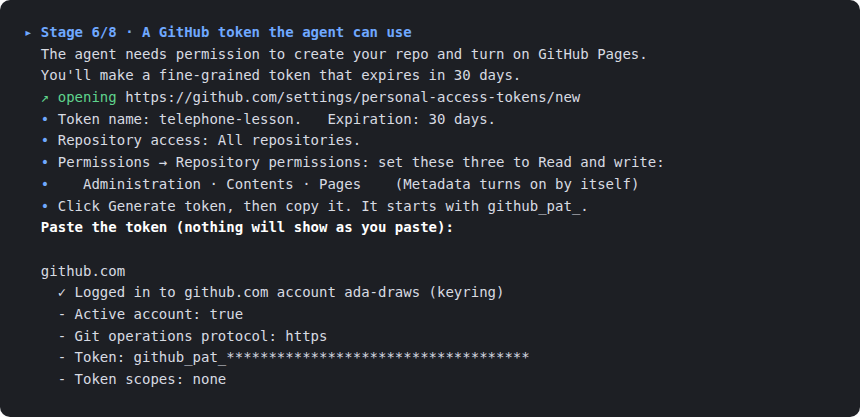
Each stage clears the screen, so you only ever see the current step: a title with the stage number, a line or two on what is happening, the page it opened for you, and a prompt. This is stage 6, the one people ask about most.
The GitHub token
The agent will create a repository and switch on GitHub Pages for you. GitHub lets you mint a token that allows exactly that and nothing else, and that dies after 30 days. The wizard opens the page; here is what it asks you to set.
| Field | Value |
|---|---|
| Where | Profile picture → Settings → Developer settings → Personal access tokens → Fine-grained tokens → Generate new token |
| Token name | telephone-lesson |
| Expiration | 30 days |
| Repository access | All repositories |
| Repository permissions | Administration, Contents, Pages: each set to Read and write. Metadata switches on by itself. |
| Then | Generate token. Copy it. Paste it into the wizard. Nothing appears while you paste; press Return. |
The token is stored by the GitHub CLI on your machine, never in a file you will see. Treat it like a password: if it ever ends up in a chat or a screenshot, delete it on the same page and make a new one.
Check it worked
Open a fresh Terminal or PowerShell and try these. Each should answer, not complain.
| Type | Expect |
|---|---|
codex --version | A version number. |
gh auth status | "Logged in to github.com account you". |
codex then /skills | A list that includes telephone, grill-me, and grilling. Type /quit to leave. |
The worksheet
Print it, or draw the same boxes on any sheet. Fill it in by hand, in pen. Ten minutes is enough. It asks for nine things: the site's name, who it is for, one sentence on what it is, three colors, a font mood, the list of pages, one thing that must be on it and one that must never be, a drawing of the homepage, and a drawing of one inner page.
Open the worksheetDraw more than you write. The agent never sees the paper. Everything reaches it through the person holding your sheet, so a labeled box beats a paragraph.
The swap
Fold your sheet once, hand it to someone you did not sit next to, and take one back. From then on:
- The author is not available. Do not walk over and ask.
- You answer the agent from the paper. When the paper has no answer, you still answer, but you start with
guess:. - You build their site, not the site you would have made. Your own ideas are guesses too.
Build it
Make a folder for today, open the agent in it, and start the lesson skill.
mkdir -p ~/telephone && cd ~/telephone && codexmkdir ~\telephone -Force; cd ~\telephone; codexCodex opens as a chat inside the terminal. Type the line below and press Return.
$telephoneWhat happens next, in order:
- Check. The agent confirms GitHub is signed in and the skills are present, then asks for the site's name from the paper.
- Grill. This is the
grill-meskill at work. It asks numbered questions in rounds, each with a recommended answer. Answer every question in the round from the paper, or withguess:. It keeps going until nothing is left open. Expect three to five rounds. - Brief. It writes two files:
BRIEF.md, every settled decision, andGUESSES.md, every guess. It asks once whether it missed anything on the paper. - Build. Plain HTML and CSS, the pages the paper listed, the colors it named, the layout it drew. It opens the result so you can compare it to the sheet.
- Publish. It creates the repository under your GitHub account, pushes, switches on Pages, and waits until the address answers. Then it prints the link and the guesses.
Keep the paper and the link together. You will show them side by side.
Common questions
The wizard says a tool is "not found" right after installing it
New tools register with the terminal only when it opens. Close the window, open a new one, run the wizard again. It skips finished stages.
Codex sign in fails
Almost always a free ChatGPT account. The CLI needs Plus. Upgrade at chatgpt.com, then run codex login again.
The wizard says GitHub did not accept the token
The paste was empty or cut short, the token was copied before you clicked Generate token, or you made a classic token instead of a fine grained one. The wizard lets you paste three times. Go back to the GitHub tab, generate a fresh token, copy the whole thing, and paste again. If it still fails, ask for help and run the wizard again later. It skips the stages that are done.
Codex says it cannot reach GitHub, or the agent's push fails
Open a terminal and type gh auth status. If it does not show your account, the token stage did not finish, or the token expired after its 30 days. Make a new token on GitHub, run the wizard again, and paste it at stage 6.
The agent asks me something the paper does not answer
Answer anyway, starting with guess:. Afterwards we compare the guesses with what the author meant, so a guess you wrote down is useful and a guess you hid just looks like a mistake.
It asks too many questions
Answer all of them. The interview stops on its own when the design has no open branches. Short answers are fine.
The link shows a 404
GitHub Pages takes about a minute to build the first time. The agent waits for it; if you checked early, reload.
Can I improve the site after?
After the class has seen it, yes. Before that, no. We want to see what survives one pass through one stranger, so keep the first version as it came out.
It's working if
- The agent asked questions in numbered rounds before writing any code.
- Your
GUESSES.mdhas entries, and each one is something the paper really did not say. - The live address opens on a phone and shows the pages the paper listed, in the colors it named.
- The thing that "must never be on it" is not on it.